Every feature of the TvZapeo IPTV player
An IPTV player to watch the live TV, Replay, movies and series from your IPTV subscription, on an Android TV, an Android box or a tablet. The aim is in the name: zap easily, without getting lost in the settings.
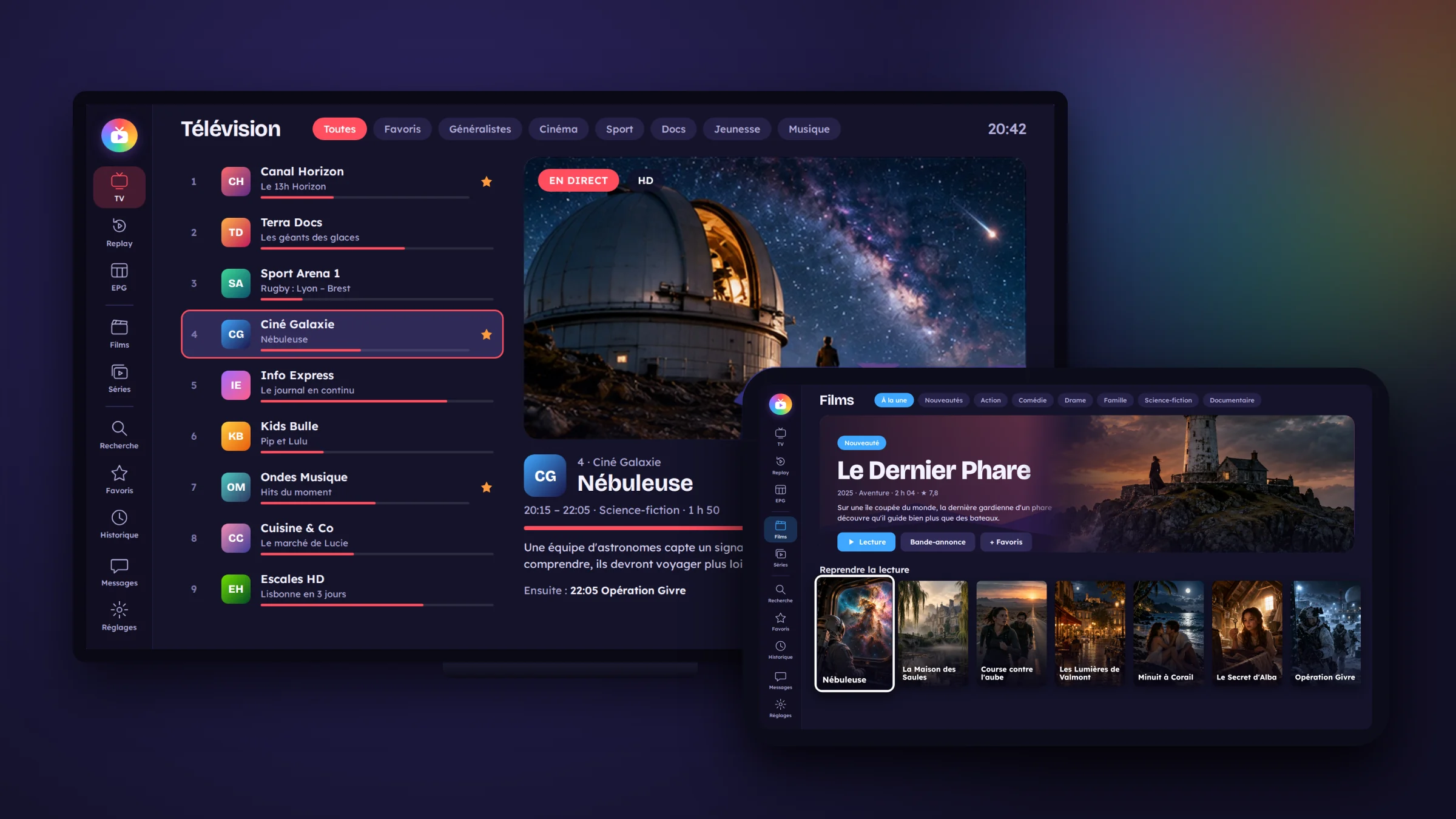
Watching live TV
- Lists and channels: your channels sorted into lists, with their logo and what is on right now, plus a preview of the selected channel.
- Zapping: in full screen, the up and down arrows change channel; the next channel’s logo appears in the centre.
- Full screen: OK puts the channel in full screen; the info bar disappears by itself after a few seconds, which protects OLED screens.
- Rewind live TV: missed the beginning? The “Start” button or the time bar takes you back in the current programme, then back to live.
- Automatic restart: if the stream drops, the app restarts the channel by itself, without asking you anything.
- Programme reminder: “Remind me” on an upcoming programme, and the app offers to play it at the right time.
Replay
- Replay section: past programmes from the channels that have Replay with your provider, day by day.
- From the guide: OK on a past programme restarts it from the beginning.
- Skip forward or back in the programme, with a clean resume at the chosen point.
- Smooth playback: a buffer on the device’s storage prevents interruptions when the provider slows down.
The programme guide
- The grid: four hours of programmes on screen, channels on the left, times along the top, the current time clearly marked, and the selected channel playing in a small preview.
- Programme details: channel, times, title, length, progress and summary.
- Extra guides: when your provider has no guide for a channel, TvZapeo finds one elsewhere, all by itself. You can also add your own.
- “Wrong guide?”: if a channel shows another channel’s programmes, you pick the right guide yourself while seeing what it lists.
- Tonight: a selection of what is on tonight, to suit your tastes.
Movies and series
- Your provider’s catalogue, with posters, filters by genre and year, and the latest additions.
- Full details: summary, cast, seasons and episodes, filled in automatically (posters, episode titles, summaries).
- Actor pages: from a movie, open an actor and see their other movies and series in your catalogue.
- Resume playback: a movie or episode you have started picks up where you left off, and the next episode plays automatically.
- Audio language and subtitles: choose the audio language and the subtitles, with an online subtitle search.
- Quality: your preferred quality (HD, Full HD…) when several versions are available.
Finding what you love
- Search: one search for channels, movies, series and actors; you can also search by voice.
- Favourites and history: your favourites close at hand, and what you have watched recently, to pick up in one click.
- Per provider: favourites, history and recent items follow the current subscription, with no mix-up between two providers.
The remote on your phone
A QR code on the TV, you scan it, and your phone becomes a remote control.
- Control the TV: change channel, choose a movie or series, pause, adjust the sound and subtitles.
- Easy typing: addresses, passwords and searches typed on the phone rather than with the remote.
- Add your subscription: send your subscription link from your phone, by QR code.
Sound
- Amplifier and soundbar: a single setting lets your amplifier decode the original sound (5.1).
- Sound delay: if the sound arrives before the picture, you bring it back in sync.
- Equaliser: bass, mid and treble, in the same “Sound” window for TV, Replay, movies and series.
- Screen off: listen to a channel without the picture (radio, news, concerts).
Comfort
- Video preview: browse channels without using your subscription’s connection.
- Read aloud: the app reads out menus and programmes for people with poor eyesight.
- Text size: from normal to very large, on every page, with a bold text option.
- Light or dark: menu on the side or menu along the top, each in light or dark, in the colour of your choice.
- Organise your channels: sort, hide or rename your channels and lists; the name you choose appears everywhere.
For the whole family
- Profiles: one profile per person, with their own avatar, favourites, history and provider.
- Parental control: adult lists and content locked with a code.
- Screen time: a daily TV allowance for each profile.
Reliability and monitoring
- One connection only: TvZapeo never connects to your provider twice at the same time. If a connection is already active at start-up, the app tells you and waits.
- Subscription health: a 7-day report shows the interruptions, and whether they come from your internet router or from the provider.
- Test my connection: a simple test of your internet speed and of the provider, for TV, movies, series or Replay.
- Several subscriptions: add several providers and switch between them; the app can tell you which one works best right now.
- Low-power boxes: a mode suited to less powerful boxes, switched on automatically when needed.
Installation and devices
- Devices: Android TV televisions and boxes; Android tablets in landscape, with touch controls.
- Adding your subscription: by QR code, from a file or with a simple form, all on one screen. Xtream Codes and M3U playlist formats.
- Languages: English, French, Dutch, Spanish and Italian; the TV’s language is picked automatically.
- Backup: your settings, favourites and profiles can be backed up (including to a USB stick) and restored.
- Updates: the app keeps itself up to date. A Google Play version is being prepared.
TvZapeo provides no channels, movies or subscriptions. It is a player: you add the IPTV subscription you already have, as an Xtream Codes login or an M3U link.
Frequently asked questions
Is TvZapeo suitable for children?
Yes: each child can have their own profile, adult lists and content are locked with a code, and you set a daily screen time for each profile.
Can I listen to a channel without the picture?
Yes, with screen-off mode: handy for radio, the news or a concert.
What if my eyesight is poor?
TvZapeo can read menus and programmes aloud, and text size goes from normal to very large, with a bold text option.
Read also
Ready to make your TV simpler?
Install TvZapeo and enjoy a free week, no credit card needed.