An IPTV player app for Android TV, Google TV and tablets
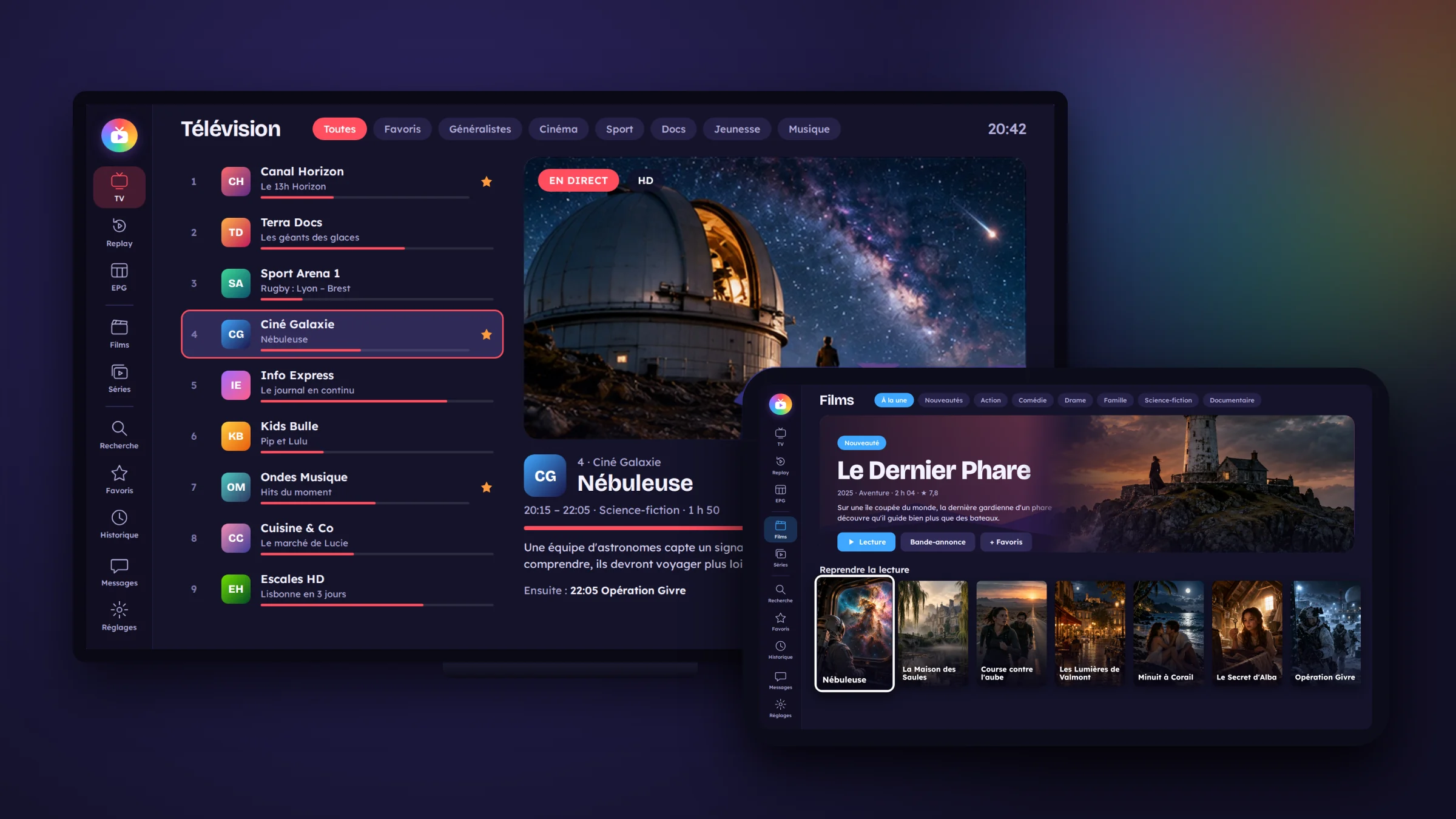
TvZapeo is an IPTV player app for Android TV, built for the big screen and the remote. It runs on any Android TV or Google TV device, and on Android tablets.
The simple rule
If your TV or box runs Android TV or Google TV (Android 6 or later), you can install the TvZapeo IPTV player on it. That covers most recent Sony, Philips and TCL televisions, the Nvidia Shield, Chromecast with Google TV and many Android boxes.
On an Android tablet, in landscape, TvZapeo works with touch. On a low-power box, the app automatically switches to a mode suited to it. And your smartphone becomes the remote: the TvZapeo remote control is built into the app.
Is my TV running Android TV?
- The home screen says “Google TV”, or shows an “Apps” row.
- In the settings, the “About” section shows an Android TV version.
- Still not sure? That is what the one-week free trial is for: install it, test it, then decide.
| You have… | Our advice |
|---|---|
| A recent Android TV or Google TV television | Install TvZapeo directly on the TV: nothing else to buy. |
| A TV that does not run Android (Samsung Tizen, LG webOS…) | Add a box: Chromecast with Google TV or Google TV Streamer (budget option) or Nvidia Shield (the most powerful). |
| An Android tablet | Install TvZapeo on the tablet to watch in the kitchen or on the move. |
Android TV and Google TV televisions
Many big brands ship their TVs with Android TV or Google TV: Sony Bravia, most recent Philips sets, TCL, some Hisense and Xiaomi models, and others. TvZapeo needs Android TV or Google TV, running Android 6 or later. No extra box needed.
- Install TvZapeo on the TV: the download link is on this website (“Download” button), and a Google Play version is being prepared.
- Open the app from the apps row.
- Choose “Add my provider” and enter your Xtream Codes login or your M3U playlist link.
- The channels, guide, movies and series from your subscription appear, and your free one-week trial begins.
Tip: typing a password with a remote takes ages. Scan the QR code shown by TvZapeo with your phone and fill everything in with the phone keyboard instead.
On a TV, everything is done with four arrows and an OK button, and TvZapeo is built around that: large icons you can recognise from the sofa, a menu in a logical order (TV, Replay, Guide, Movies, Series) and a colour for each section so you always know where you are. You get a preview of the channel before going full screen, the current and next programme right in the list, and a long press on OK for favourites, sorting, hiding, renaming or fixing the guide. In full screen, the up and down arrows change channel, with the next channel’s logo shown in the centre.
As for picture quality, TvZapeo plays what your provider sends: if the stream is Full HD or 4K, you watch it in Full HD or 4K, within the limits of your TV and your connection. For a stable picture, use a network cable rather than Wi-Fi whenever you can.
Nvidia Shield TV
Powerful, fast and kept up to date for years, the Nvidia Shield is a favourite Android TV box among IPTV fans, and TvZapeo runs perfectly on it.
- Power: large channel lists, a full week of programme guide and big movie catalogues open quickly.
- Wired network: the Shield has an Ethernet port, and for IPTV a cable is more stable than Wi-Fi.
- 4K and multichannel sound: if your provider sends 4K or 5.1 audio, the Shield can play it. In TvZapeo’s “Sound” window, a single setting lets your amplifier decode the original sound.
- Long-term support: Nvidia has updated the Shield for years, which keeps it compatible with recent apps.
Installation is the same as on a TV: install TvZapeo with the download link on this website (“Download” button), then choose “Add my provider”. A few recommended settings: connect the Shield with a network cable, and in the Shield’s display settings let the frame rate match the content if your TV supports it, so movies look smoother. Both the “tube” Shield and the Shield Pro run TvZapeo very well; the Pro has more memory and USB ports, useful if you also use it for other things.
Chromecast with Google TV and Google TV boxes
Samsung (Tizen), LG (webOS) and older televisions do not run Android. Rather than replacing the TV, plug a Google TV box into an HDMI port: Chromecast with Google TV, its successor the Google TV Streamer, or another Google TV box. It comes with its own remote.
- Plug the box into the TV and finish its setup (Google account, Wi-Fi).
- Install TvZapeo on the box: the download link is on this website (“Download” button), and a Google Play version is being prepared.
- Open TvZapeo and choose “Add my provider”.
- Enter your Xtream Codes login or your M3U link: you are ready.
Good to know: small boxes have less memory than a Shield. TvZapeo has a mode suited to low-power boxes, switched on automatically when needed; with very large lists, opening can just take a few extra seconds. Keep the router not too far away, or add a USB-C Ethernet adapter for a steadier picture. The box’s remote is all you need, and your phone can act as a remote too.
Android tablets
The same app as on the TV, but with touch: for the news in the kitchen, a film in bed or a series on holiday. TvZapeo keeps its large colour-coded sections (TV, Replay, Guide, Movies, Series), series pick up at the right episode and the right minute, movies keep their “Resume” point, and the programme guide scrolls with a swipe.
- Install TvZapeo on the tablet: the download link is on this website (“Download” button), and a Google Play version is being prepared.
- Open the app, in landscape.
- Choose “Add my provider” and enter your Xtream Codes login or your M3U link.
A tablet counts as one device. If you use TvZapeo on both the TV and the tablet, choose the 2 device plan, or add a licence later: licences add up.
Watch out for your subscription: many providers allow only one screen at a time. TvZapeo never connects to your provider twice at the same time: if something is already playing elsewhere, the app tells you and waits, instead of risking a block.
Remember: TvZapeo is a player only. It provides no channels, movies or series; you use it with your own legally purchased subscription.
Frequently asked questions
Does TvZapeo work on a Samsung or LG TV?
Not directly: these TVs do not run Android TV. Plug an Android TV or Google TV box into an HDMI port, such as a Chromecast with Google TV, a Google TV Streamer or an Nvidia Shield.
Is an older Chromecast without a remote compatible?
No. Older Chromecasts without a remote can only “cast” from a phone; you cannot install apps on them. You need a model with Google TV.
Will a Fire TV Stick do?
TvZapeo is designed for Android TV and Google TV televisions and boxes. To be sure everything works, choose a Google TV box.
My Android TV is a few years old. Will it work?
TvZapeo needs Android 6 or later. On older, less powerful TVs, the free trial lets you check that everything stays smooth before you buy.
Is there a version for iPad?
No. TvZapeo is an Android app: Android TV televisions, Google TV boxes and Android tablets.
Do I need a special remote?
No. The remote that came with your TV or box is enough, and your smartphone can also act as a remote thanks to the built-in TvZapeo remote control.
Does TvZapeo play 4K?
Yes, if your provider sends a 4K stream and your TV, box and connection can handle it.
Ready to make your TV simpler?
Install TvZapeo and enjoy a free week, no credit card needed.